

markermd is a Shiny-based grading environment for assignments submitted as git repositories containing Quarto (.qmd) or R Markdown (.Rmd) documents, such as the classroom layouts produced by ghclass’s org_grade_assignment(). Each submission is parsed into a document tree (via q2r), validated against the structural requirements of the assignment, and graded question by question with a fast, hotkey-driven rubric interface. Everything (the template, the rubric, and all recorded grading) lives in a per-project SQLite database.
The package is built around two apps:
-
template()authors a grading template: which document sections are the questions, and what structural rules each answer must satisfy. -
mark()grades a collection of student repositories against that template with per-question rubrics.
Around the apps, a set of helper functions (validate_project(), parse_project(), template_import() / template_export(), rubric_import() / rubric_export(), marks_import() / marks_export() / marks_set(), export_marks()) makes the entire workflow scriptable, and bundled agent skills (for Claude Code and Codex) can scaffold the template and rubric, repair submissions the strict parser rejects, or apply the rubric across all submissions as a first pass for human review.
Experimental status
This package is experimental: APIs may change significantly and some features are incomplete.
This project is also an ongoing experiment in “vibe” coding with Claude Code. Not all implementation details have been thoroughly evaluated and there is a lot of wonkiness throughout the codebase.
Installation
You can install the development version of markermd from GitHub:
# Install from GitHub
# install.packages("pak")
pak::pak("rundel/markermd")

# Or using remotes
remotes::install_github("rundel/markermd")
Dependencies
markermd relies on q2r for parsing Quarto documents. q2r wraps the Quarto parser via Rust, so a Rust toolchain (rustc >= 1.85) is required to install it:
remotes::install_github("rundel/q2r")Quick start
A markermd project is a directory containing the student repositories, and optionally a solution (key) repository and rendered reports:
hw01/
├── repos/
│   ├── student1-hw01/
│   │   └── assignment.qmd
│   ├── student2-hw01/
│   └── ...
├── html/              # rendered reports, shown while grading
└── hw01-key/          # solution repository (optional)
library(markermd)

# One-time setup: writes .markermd/config.yml, creates the grading
# database, installs the bundled agent skills, and writes CLAUDE.md /
# AGENTS.md project instructions for them
init_project("hw01")

# Author the grading template (questions + validation rules)
template("hw01")

# Grade the student repositories
mark("hw01")
init_project() detects the key repository and artifact directories, records everything in hw01/.markermd/config.yml, and creates the SQLite database that stores the template, rubric, and all grading. project_sitrep() prints an overview of a project’s configuration at any point, and project_set() changes it (including artifacts =, the directories of rendered reports). Re-running init_project() keeps the configured artifact directories rather than adding every new top-level folder; rescan_artifacts = TRUE rebuilds the list.
Template creation with template()
The template app loads an assignment (a project’s key repository, a single .qmd/.Rmd file or directory, a saved template, or a GitHub <owner>/<repo>) and displays its structure as an interactive tree. Headings are the selectable units: selecting one maps the document section beneath it to a question. Each question then gets validation rules (counts of chunks, markdown blocks, or other node types; content checks; name checks) along with optional filters that narrow which nodes the rules see. Point values are not part of the template; each question’s total is set with its rubric while grading.
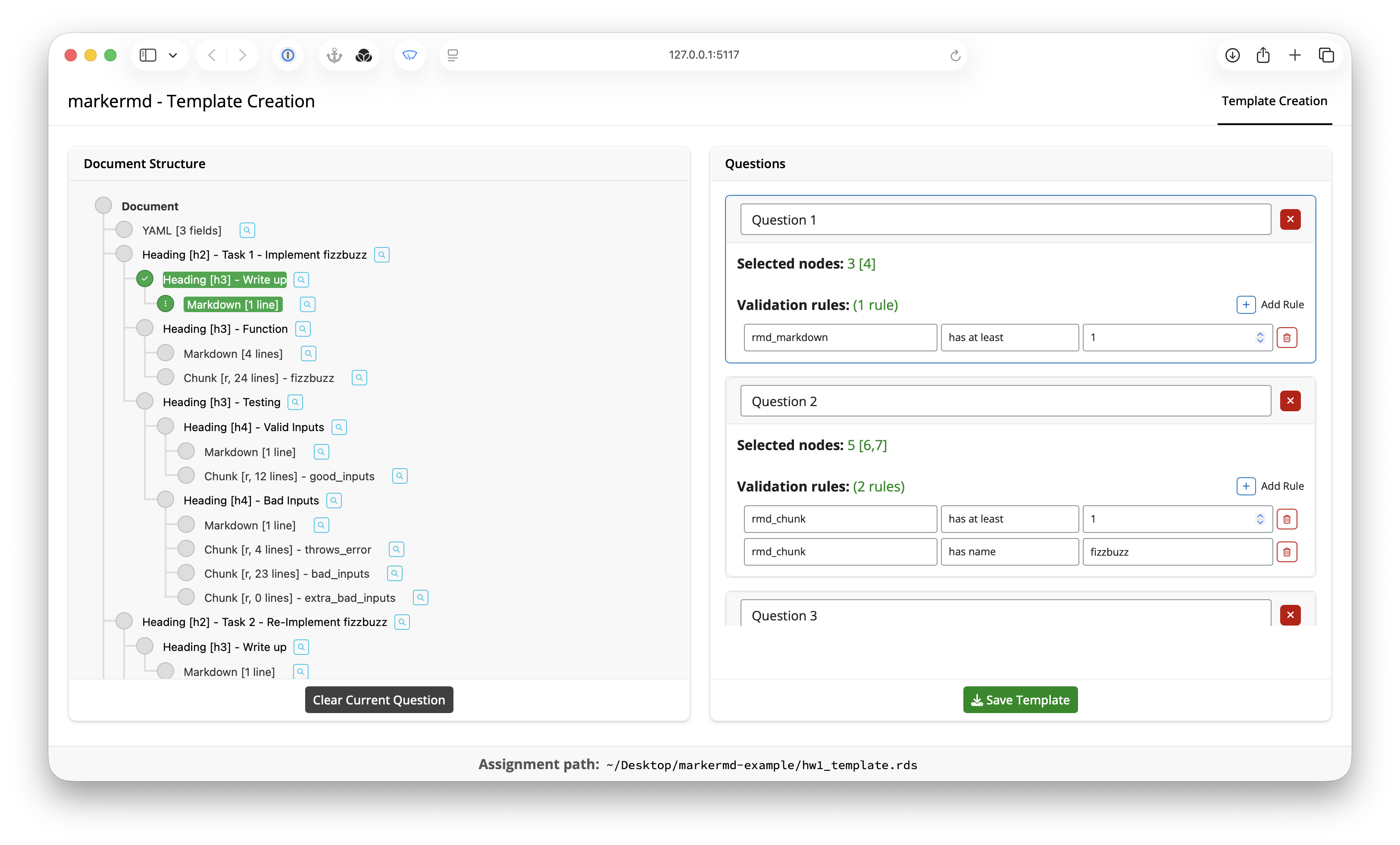
Some problems belong to no single question: a render setting in the YAML header, global chunk options, a document that does not render. “Add Document Entry” creates a document-scope question for them. It selects no sections (its filters and rules, if any, run against the whole document), and is written as scope: document in the template YAML (format 3.1). Add one only when a submission needs it. Paired with rubric scoring worth 0 points, marked optional and not bounded below zero, it records such a problem once as a deduction from the total instead of spreading it across the questions it affects.
When the app is opened on an initialized project, saving writes the template directly into the project database, ready for grading.
Grading with mark()
mark() opens an initialized project and sources everything from it: the student repositories, the stored template, the grading database, and each repository’s rendered reports.
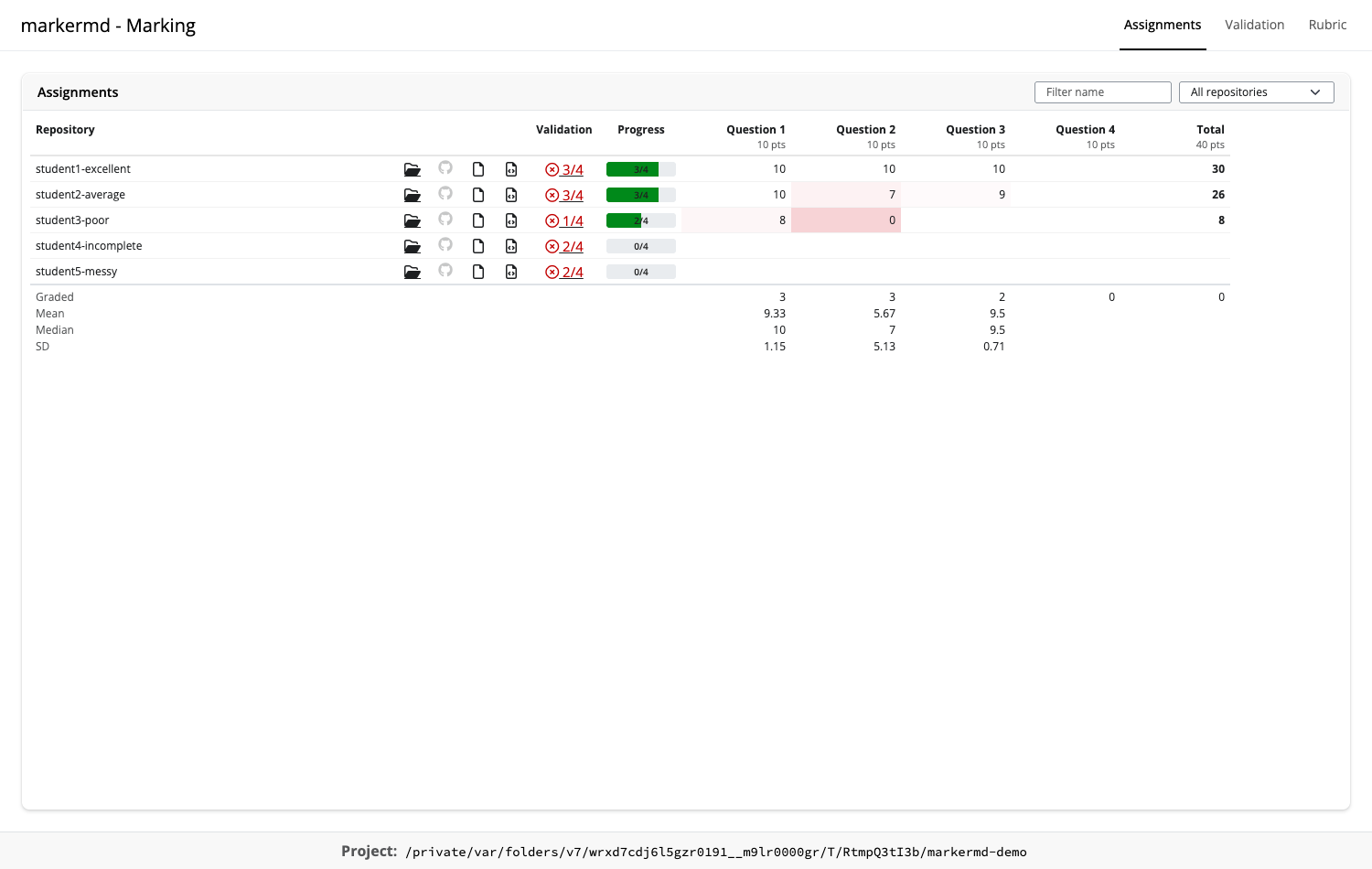
Assignments
The app opens on the Assignments tab, one table with a row per repository: links to its folder, GitHub repository, rendered report and source, its validation status, its grading progress, and its score per question and in total, computed from the rubric selections exactly as export_scores() would. The class summary is pinned beneath the rows: how many repositories are graded, then the mean, median and standard deviation per question and for the total. The table filters by name and by status (failed validation, incomplete, complete), sorts by any column, and updates as grading proceeds. Clicking a repository’s validation marker opens it in the Validation tab, and clicking a score opens that repository and question in the Rubric tab.
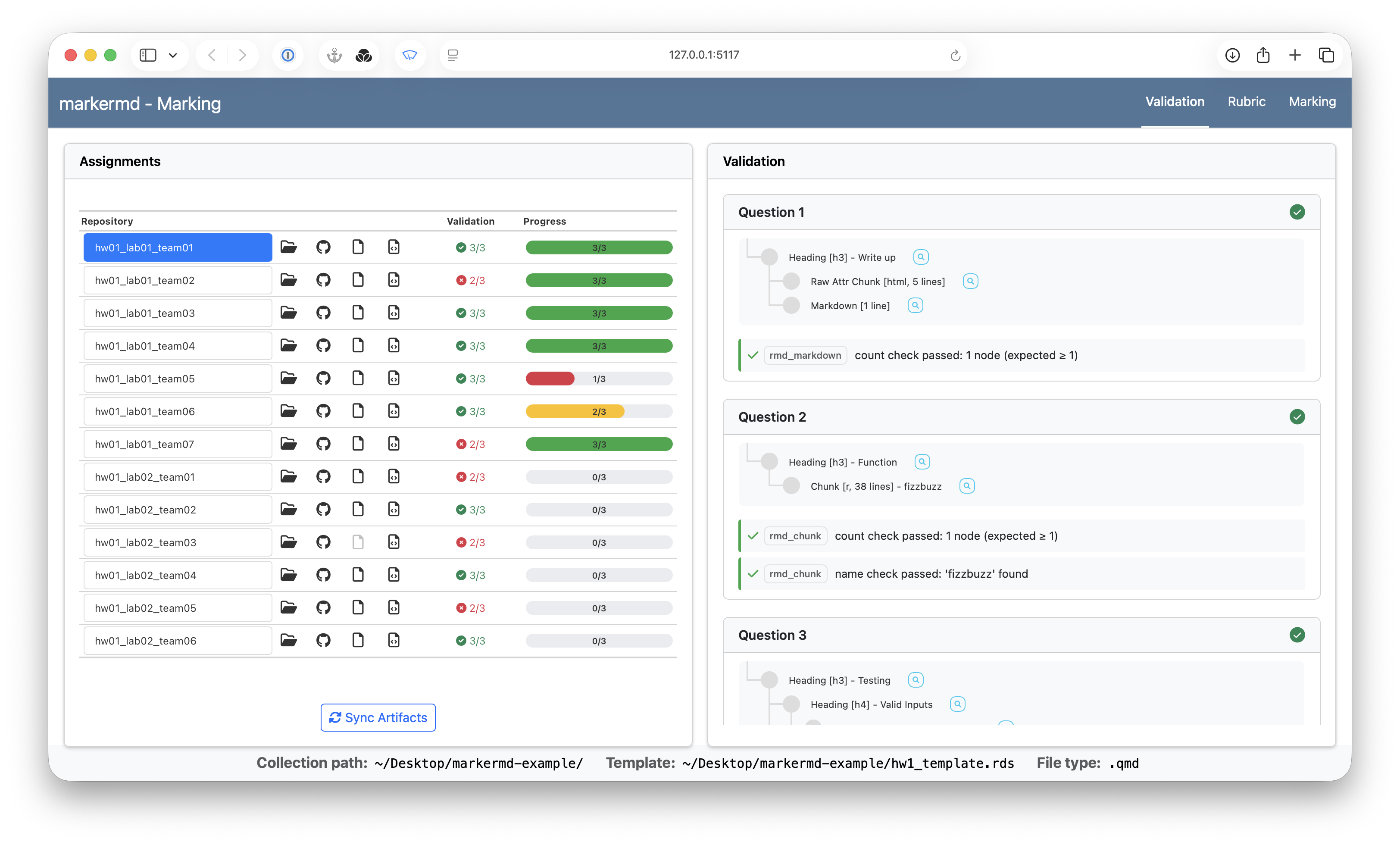
Validation
The Validation tab checks the selected repository against the template’s rules, so structural problems (missing sections, missing chunks, absent content) are visible before any grading starts. Its repository selector, whose entries carry each repository’s count of passed questions, stays in step with the rest of the app, and a question selector beside it, whose entries carry each question’s pass or fail mark for that repository, jumps to a question’s results. Each question’s results collapse behind their header, and a collapsed question stays collapsed while moving between repositories.
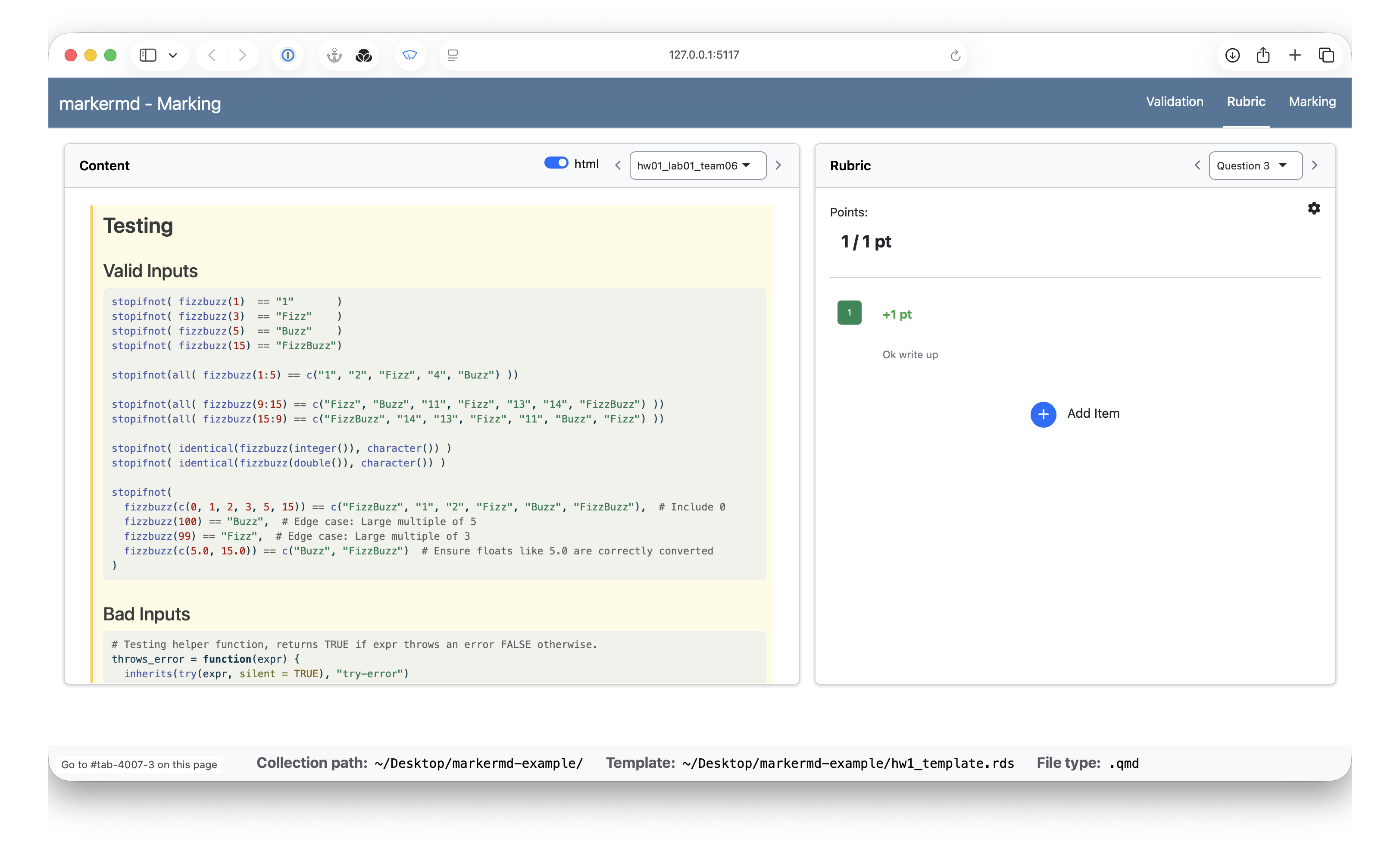
Rubric
The Rubric tab is where grading happens. The left pane shows the student’s rendered report or source; the right pane shows the current question’s rubric. Items toggle by click or number-key hotkey (the first ten items of a question get the keys 1-9 and 0; there is no limit on items, and any beyond the tenth toggle by click), and the score follows from the question’s scoring setup (additive or deduction mode, with optional clamping between zero and the question total; clicking the score display edits the total, and the gear popover holds the mode and bounds). Items that stack can be placed in a named group with a floor or ceiling on their combined points, so every defect is recorded while the deductions stay proportionate, or made exclusive so only one severity tier can be selected; a group’s header shows its live subtotal and flags a bound that was hit, and a badge beside the score opens the breakdown. Below the items are two comment boxes: a public, student-facing comment (which also marks the question as graded) and private notes that are never shared with students. Every action autosaves to the project database.
Rubric items can be added, edited, reordered, and grouped while grading (Add Group creates a group whose settings popover holds its label, bounds and exclusivity; each item’s group menu moves it in or out), and the rubric pane’s menu offers YAML import and export for editing the rubric outside the app.
History
The History tab lists the project’s snapshots: named, timestamped copies of the grading state (template, rubric and marks) kept inside the project database. Snapshots are taken automatically before every bulk change (a rubric import, deleting an item that has selections, deleting a group, a restore), and by hand from the camera button or the s key, with a label and a summary of what is about to change. Selecting a snapshot shows its fields and notes, what changed between it and the current state (or any other snapshot): items added, removed, reworded or re-pointed, selections and comments changed, and every repository’s total before and after; and the scores it recorded. From there a snapshot can be restored (undoing every change since to the rubric and marks, or to chosen questions and repositories), exported to YAML files, pinned, or deleted, and the database file backed up. The navbar shows when the latest snapshot was taken and how many selections have been recorded since, turning amber when that number grows large, as a nudge to take a named checkpoint at the end of a session.
Scripting the workflow
Everything the apps do is also available headlessly:
# Check every student repository against the stored template
validate_project("hw01")

# Templates, rubrics, and recorded marks round trip between the
# project database and editable YAML files
template_export("hw01-template.yaml", project = "hw01")
rubric_import("hw01-rubric.yaml", project = "hw01")
marks_export("hw01-marks.yaml", project = "hw01")

# Record marks for a single repository/question pair
marks_set("student1-hw01", "Question 2",
  items = "Looks good",
  private_comment = "Quartiles and summary statistics all present.",
  project = "hw01"
)
The YAML formats are validated against bundled JSON Schemas (see system.file("schema", package = "markermd")) and are deliberately simple enough for LLM tools to author. Marks imports are conservative by default: repository/question pairs that already have grading activity are skipped unless explicitly overwritten.
Snapshots
Every bulk change to the grading state takes a snapshot of the state it replaces, in the same transaction, so a change cannot succeed without its snapshot. The imports take a summary so the reason for a change is recorded with it, and the snapshots can be listed, compared, exported and restored from R (and from the History tab of mark(); the template editor offers a take-snapshot and a load-a-snapshot’s-template control):
# A named checkpoint before a multi-step change
snapshot_create("hw01", label = "Before feedback review",
  summary = "Re-checking every Q1 selection against the reviewed standard.")

# Imports record their reason on the snapshot they take
rubric_import("hw01-rubric.yaml", project = "hw01", mode = "replace",
  summary = "Feedback review: lenient Q1a standard, unrequested items to 0 pts")

# What changed since, and what it did to the grades
snapshot_list("hw01")
snapshot_diff("Before feedback review", project = "hw01")

# Undo (the state before the restore is snapshotted first)
snapshot_restore("Before feedback review", project = "hw01",
  summary = "The review's Q1c severities were wrong.")

# An archive of one snapshot as YAML files, and a copy of the database file
snapshot_export("Before feedback review", "backups/before-review", project = "hw01")
project_backup("hw01")
Snapshots live in the project database (schema version 5; an existing database gains a baseline snapshot when first opened). Identical parts are stored once, an automatic snapshot of an unchanged state is recorded as a note on the latest one rather than a new row, and snapshot_prune() removes old automatic snapshots while keeping every manual or pinned one. export_scores() and export_comments() record which snapshot each export came from, and project_sitrep() reports the snapshot state, including whether the exported scores are stale.
Exporting results
When grading is complete, export_marks() writes the final hand-off artifacts from the project database (or run export_scores() and export_comments() individually):
export_marks("hw01")-
export_scores()writesscores.csvto the project root: one row per repository, one column per question, plus atotalcolumn. Scores are recomputed exactly asmark()displays them, passing each question’s selected rubric item points (each item group’s combined points first clamped to its floor and ceiling) through its grading mode and bounds. Ungraded repository/question pairs export asNA, and a repository’s total staysNAuntil all of its questions are graded. A question whose scoring is marked optional (the gear popover’s “Optional: nothing selected still counts as graded”, oroptional: truein the rubric YAML) counts as graded for every repository, scoring as if no item were selected until something is recorded; its column in the Assignments table has a small red dot beside the name. -
export_comments()writes each repository’s student-facing feedback tocomments/<repo>.md(or the project’s configured comments directory). Each graded question appears as a heading, in template order (document-scope questions first), followed by a bulleted list of its selected rubric item descriptions and public comment. Group bounds are never mentioned; withgroup_headings = TRUEa group’s selected items are listed under a subheading carrying its label. Private notes are never exported, and a repository with no public feedback gets no file.
Agent skills (Claude Code and Codex)
init_project() installs four agent skills into the project, in two sets: a Claude Code set under .claude/skills/ and a Codex set under .agents/skills/ (the agents argument selects one or both; the default installs both). Both sets follow the Agent Skills format and share the same names, so a skill is invoked as /markermd-fix-parsing in Claude Code and $markermd-fix-parsing in Codex:
-
markermd-scaffold-template: builds a starter grading template from the key repository’s assignment document. -
markermd-fix-parsing: repairs student documents that the strict q2r parser rejects, making the smallest possible edits on agrading-fixesbranch in each repository so the original submission stays intact, and flags any substantive change in the document. -
markermd-scaffold-rubric: drafts per-question rubric items and scoring from the key, optionally sampling student submissions to anticipate common mistakes. -
markermd-apply-rubric: applies the stored rubric to every student repository as a first-pass machine grading, recording its reasoning as private notes for human review inmark().
init_project() also writes a project instructions file for each selected agent at the project root (CLAUDE.md for Claude Code, AGENTS.md for Codex) describing the project layout, the workflow and skills, the headless entry points, the template, rubric, and marks YAML formats, and the rules for working with student submissions. An existing file is kept, so it can be customized per project, unless overwrite_instructions = TRUE replaces it with the packaged version (to pick up a newer markermd’s instructions); instructions = FALSE skips it.
See inst/skills/README.md for details and per-user installation.